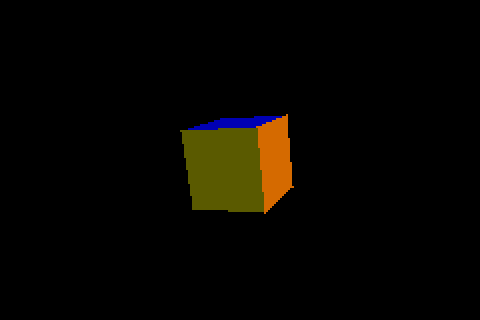
Introduction
Earlier articles on this blog about the Game Boy Advance and the Nintendo
DS, among them the cycle-level optimization one
and the one on faking point lights on the DS GPU,
shared a premise: these machines have a CPU with no floating-point unit,
and a graphics pipeline that makes you pay for every vertex somewhere. The
GBA pays in rasterizer cycles. The DS has a real hardware 3D engine, so it
pays somewhere else, and that somewhere turned out to be the part of the
frame nobody was looking at.
Note
framer-engine is a personal side project. The source code will be
made publicly available once the engine reaches a sufficient level of
maturity.
The framer-engine spinning_shapes example puts a cube, a sphere and
a cone on screen, each rotating, and a button toggles between drawing them
solid and drawing them as wireframes. On the DS it ran at 60 FPS in solid
and about 20 in wireframe. Wireframe should be the cheaper of the two:
fewer pixels filled, no lighting. That a debug visualization would be three
times slower than the real thing was the bug report, and there was a
second, less obvious question behind it: how do you even measure a frame on
a platform you can only run in an emulator?
How wireframe gets drawn on a GPU that has no lines
The DS 3D engine draws triangles and quads, and nothing else:
framer-engine's source notes that libnds' glBegin() takes only
triangles and quads (and their strips), with no line primitive. The hardware does
have a wireframe polygon mode, selected by a polygon alpha of zero, but it
outlines a polygon's own edges. The engine's meshes keep a separate list of
the edges they actually want drawn, and for a sphere that list leaves out
the diagonals that split each patch into two triangles; asking the
hardware for wireframe would draw them. (That is the reasoning, not an
experiment: the mode was never tried.) So wireframe here means what it does
on most hardware without lines: a thin quad along every edge, drawn flat and
unlit.
Building that quad takes some care. It has to be widened perpendicular to
the edge, in a direction that makes sense for a convex mesh centered on its
own origin, so the code takes the direction from the mesh's origin to the
middle of the edge and removes the part of it along the edge:
/* per edge, every frame */
float edge_len = sqrtf(edge[0]*edge[0] + edge[1]*edge[1] + edge[2]*edge[2]);
float mid_len  = sqrtf(mid[0]*mid[0] + mid[1]*mid[1] + mid[2]*mid[2]);
dir[k]    = edge[k] / edge_len;          /* k = 0..2 */
radial[k] = mid[k]  / mid_len;
dot       = radial[0]*dir[0] + radial[1]*dir[1] + radial[2]*dir[2];
width[k]  = radial[k] - dot * dir[k];    /* perpendicular to the edge */
width_len = sqrtf(width[0]*width[0] + width[1]*width[1] + width[2]*width[2]);
width[k]  = width[k] / width_len * half_width;
/* then four vertices: a -/+ width, b +/- width, as 4.12 fixed point */
Correct, and unremarkable on a PC. On the DS's ARM9 it is three square
roots, nine divides, roughly fifty multiplies and adds and twelve
float-to-fixed conversions, per edge, every frame, and every one of those
is a call into a software floating-point routine.
Why not just look at the frame rate
The obvious next step, running the ROM in an emulator and reading the
frame counter, is the one that tells you least. melonDS' own speed varied a
lot from run to run in earlier debugging sessions on this project, so
anything derived from wall-clock time or its frame counter says more about
the host machine than about the console. What does hold still is the
emulated hardware's timers: the same ROM executes the same instructions
and the DS timers count them the same way every run.
libnds exposes two of them chained into a 32-bit counter through
cpuStartTiming() and cpuEndTiming(), which return ticks of the
hardware timer clock (about 33.5 MHz, the bus clock; the ARM9 itself runs
at twice that). A throwaway build wraps the 3D render system and stores the
result in a global per render mode:
volatile uint32_t g_diag_ticks[2];   /* [0] solid, [1] wireframe */
volatile uint32_t g_diag_count[2];

static void nds_hw3d_render_system(framer_iter_t *it)
{
    int w = framer_render_mode_get_override() ==
            FRAMER_RENDER_MODE_FORCE_WIREFRAME;

    cpuStartTiming(0);
    nds_hw3d_render_system_impl(it);   /* the real system, unchanged */
    g_diag_ticks[w] = cpuEndTiming();
    g_diag_count[w]++;
}
A copy of the example toggles the render mode itself every 120 frames, so
one emulator launch produces both numbers, and the globals are read over
melonDS' GDB stub, with their addresses taken from nm on the ARM9 ELF:
ticks = struct.unpack('<2I', bytes(rsp.read_mem(sock, tick_addr, 8)))
count = struct.unpack('<2I', bytes(rsp.read_mem(sock, count_addr, 8)))
The first run settled the question. Run twice, the figures agreed to within
a few ticks, which is the property that makes them usable:
| Mode |
Ticks per frame |
Time |
|---|
| Solid |
317,950 |
9.5 ms |
| Wireframe |
1,414,850 |
42 ms |
A 60 FPS frame is 16.7 ms. Solid fits with room to spare. Wireframe takes
42 ms in the 3D pass alone, which is more than two vertical blanks, so the
frame lands on the third and the screen updates every 50 ms: 20 FPS, to the
number. The frame rate wasn't a mystery, it was a quantization of a cost.
Where 1.4 million ticks go
The meshes are not small. The sphere has 20 sectors and 10 stacks, which is
430 edges and 360 triangles; the cone adds 40 edges and 40 triangles and
the cube 12 and 12. A wireframe frame therefore builds 482 quads, and a
solid frame submits 412 triangles. Dividing:
- wireframe: 1,414,850 / 482, about 2,900 ticks per edge, roughly 5,900
ARM9 cycles for the arithmetic above;
- solid: 317,950 / 412, about 770 ticks per triangle, which is a normal and
three vertices converted to fixed point and handed to the GPU, with no
square root and no divide anywhere in it.
So the GPU was not what set the cost in either mode. The CPU was, and in
wireframe it spent 42 ms of every frame, two and a half frame budgets, on
arithmetic whose answer is the same on every frame.
The data never changes
That last sentence is the whole fix. The cube is the same cube every
frame: only the model matrix it is drawn under changes, and the hardware
applies that matrix itself, on the GPU, from a matrix stack. Every
square root and every divide in that loop is computing the same four
vertices it computed 1/60th of a second earlier.
The DS has a mechanism for exactly this: a display list, a block of
pre-packed geometry-engine commands that glCallList() sends to the GPU
FIFO by DMA. Its layout is the hardware's own FIFO layout, documented in
GBATEK: a first word with the number of words that follow,
then groups made of one word holding up to four command ids, one per byte,
followed by the parameter words of those commands in order. A quad with
four vertices comes out as:
word 0   count
word 1   BEGIN_VTXS | VTX_16 | VTX_16 | VTX_16     (0x23232340)
word 2   1                                          (GL_QUADS)
word 3   x0 | y0 << 16                              vertex 0
word 4   z0
word 5   x1 | y1 << 16                              vertex 1
word 6   z1
word 7   x2 | y2 << 16                              vertex 2
word 8   z2
word 9   VTX_16 | NOP | NOP | NOP                   (0x00000023)
word 10  x3 | y3 << 16                              vertex 3
word 11  z3
Writing the packer is the small part: about eighty lines of plain C with
the command ids defined next to it (BEGIN_VTXS is 0x40, NORMAL 0x21
and VTX_16 0x23), no libnds dependency, and so unit-tested on the
desktop like any other pure logic in the engine, with the layout above as
one of the tests. libnds documents one trap that the packer simply avoids:
the END_VTXS command does nothing and is reported to cause trouble in a
DMA'd list, so lists never contain it.
void gx_dl_cmd(struct gx_dl *dl, uint8_t id, const uint32_t *params, int n)
{
    if (dl->slot == 4) {                 /* open a new command word */
        dl->cmd_at = dl->len++;
        dl->words[dl->cmd_at] = 0;
        dl->slot = 0;
    }
    dl->words[dl->cmd_at] |= (uint32_t)id << (8 * dl->slot);
    dl->slot++;
    for (int i = 0; i < n; i++)
        dl->words[dl->len++] = params[i];
}
The renderer bakes a mesh the first time it is drawn in a given mode: the
edge quads for wireframe, the triangles with their flat normals for solid.
After that a draw is a colour, a glCallList() and nothing else. Only
what is identical on every draw goes into a list; the colour, the
material, the polygon format and the model matrix stay with the caller, so
the same list serves every object that shares a mesh. Two kinds of object
keep the old triangle-by-triangle path because they vary something a list
would have to hold: objects with a colour per face, since the material
changes between faces, and textured ones, since their texture coordinates
are scaled by the texture's size. The old immediate wireframe code also
stays, as the fallback for a mesh that cannot be baked: more than eight
different meshes in a program, or no memory left for the list.
Results
Same scene, same instrumented build, measured the same way:
| Mode |
Before |
After |
Change |
|---|
| Solid |
317,950 |
18,500 |
17 times cheaper |
| Wireframe |
1,414,850 |
24,450 |
58 times cheaper |
The wireframe pass goes from 42 ms to 0.73 ms and solid from 9.5 ms to
0.55 ms. The two modes now cost about the same, which is what the original
bug report had assumed all along.
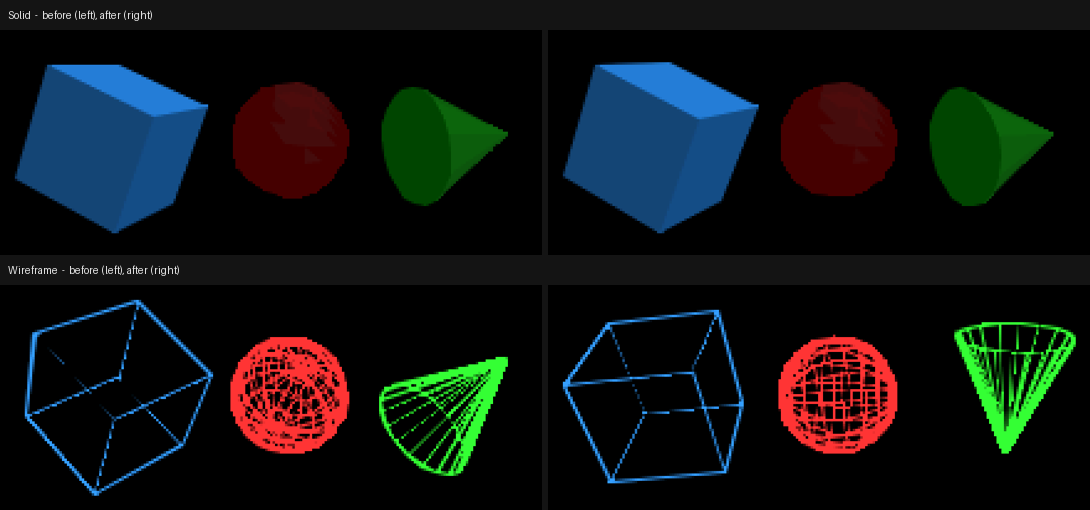
Faster is only worth anything if it is the same picture. The figure below
is the top screen before and after, captured from the emulator window in
the same runs as the numbers; the shapes are at different points of their
rotation because the demo keeps spinning, but the shading and the lines
are the same.
Three caveats belong next to those numbers:
- The GPU still has to consume the list. glCallList() flushes the
list from the data cache, starts the DMA and waits for it to finish, and
the DMA only completes once the geometry FIFO has accepted the data. melonDS
models the geometry engine's timing only roughly, so on a real console
that wait will be longer than 0.7 ms. It is waiting on the GPU, not
computing, and nothing was measured on real hardware.
- The first draw pays the old price once. Baking runs the original math
one time per mesh and mode, so the first frame in wireframe still does
what every frame used to. It is a one-off hitch rather than a rate, and
an unmeasured one.
- Lists cost memory. About 15 KB for the sphere's wireframe and 12 KB
for its solid list, allocated from the heap and held for the life of the
program.
What is still on the slow path
Objects with per-face colours and textured objects still submit triangle
by triangle, so a scene dominated by them gets none of this. Both can be
baked too: a per-texture-size list for the textured case, and one list per
colour run for the face-coloured one. They are the next candidates, and
the same method applies: measure the render system's ticks first, in the
mode that looks slowest, and let the number say where the frame went.
Introduction
The previous article on this blog was about the
static, no-heap Entity Component System framer-engine runs on GBA and
NDS: a fixed table of component slots and a fixed table of entities,
sized to fit in a machine with no malloc(). That fixed sizing has a
consequence the article didn't need to dwell on at the time: with today's
component set, the table has room for 64 real entities. A caravan-style
vertical shoot-'em-up, the first playable milestone this engine is
building toward, wants several hundred bullets on screen during a dense
pattern. Neither number moves to meet the other — the entity table isn't
growing to fit a bullet count, and a bullet pattern isn't capping itself
at 64 shots to fit the table.
Note
framer-engine is a personal side project. The source code will be
made publicly available once the engine reaches a sufficient level of
maturity.
The tension is old and the usual answer is old too: don't make every
bullet an entity. What took two attempts wasn't the bullet simulation
itself — a flat array of structs, advanced by one system, is not a hard
problem — it was deciding how that array gets drawn without quietly
opening a second, ECS-shaped hole in the renderer. The first answer
shipped, worked, and was wrong in a way no test had a reason to catch.
The second answer was smaller, matched a pattern the engine already had,
and went on to surface three real bugs across three different rendering
backends, none of which were about bullets at all.
The first answer: a queue that isn't an entity
The obvious shape for "hundreds of short-lived things, updated every
frame, drawn every frame, never touched individually by name" is a
per-frame queue: a flat array of draw commands (position, sprite, frame),
reset at the start of each frame, appended to by whatever wants something
drawn, and consumed once by the renderer at the end of it. A bullet pool
fits that shape exactly — push one entry per live bullet, once, after the
physics step — and it required nothing new from the ECS at all, since
nothing about it touched an entity, a component, or a query.
That was also exactly the problem. Every other thing this engine draws —
a sprite, a tilemap, a HUD label — is an entity carrying a component, and
every renderer's draw phase is systems iterating queries. A queue fed
directly by application code and drained directly by the renderer is a
second path with none of that: it isn't visible to the entity-inspection
API a previous milestone added, it isn't something a capability query
knows exists, and it isn't something any of the debugging tooling built
around "the ECS is the whole scene" has any way to see. It worked, in the
narrow sense that bullets appeared on screen in the right place moving
at the right speed. It didn't survive being looked at as architecture:
elements without an entity, bypassing the engine's own core model,
aren't a smaller version of the real design — they're a different
design that happens to render the same pixels.
The second answer: an entity that stands for many
framer-engine already had a component that solves this exact
class of problem, for a different feature: a Tilemap is one entity
whose component points at a grid the owner keeps, and the renderer draws
the whole grid from that one entity every frame. Nothing about "many
drawn things, one piece of external memory, one component pointing at
it" is specific to tiles. The rewrite generalizes that shape and gives it
a name — SpriteBatch — and the bullet pool becomes one more caller
of it instead of a bespoke path of its own:
struct framer_batch_sprite {
    int32_t x, y;       /* center, world units, fixed point */
    uint32_t texture;
    uint8_t frame;
    uint16_t size;       /* drawn size, world units, fixed point */
};

struct sprite_batch {
    const void *first;   /* owner's element array */
    const uint16_t *count; /* owner's live-element count */
    uint16_t stride;      /* bytes between elements */
};
A framer_bullet places its own struct framer_batch_sprite as its
first field, so the bullet pool's own storage array is the
SpriteBatch's element array — no copy, no second buffer kept in sync.
framer_bullet_pool_entity_create() gives the pool's one entity both a
BulletPool component, stepped every frame by a physics system, and a
SpriteBatch component built from the same array, drawn every frame by
the renderer. Every renderer's draw phase still only ever does one thing:
iterate a query and draw what it finds. Hundreds of bullets stay out of
the 64-slot entity table; nothing draws that isn't reachable from an
entity.
That much is a straightforward generalization of an existing pattern, and
it's also where the interesting bugs started, because a component that
every renderer backend has to independently learn to draw is a component
that gives every renderer backend its own chance to get it wrong.
Bug 1 (Vulkan): a guard that was checking the wrong component
Every renderer backend's sprite system is imported once per world, and
every one of them has to answer the same small design question: how do
you know "once" has already happened? The naive answer, comparing the
stored world pointer against the one you were just called with, breaks
the moment a different world gets allocated at the same address —
which is exactly what every test in this codebase does, tearing a world
down and creating a fresh one for the next case. The existing convention
across this codebase's renderer imports is therefore to also check that
some component the import function itself registers is actually present
on the world in front of you, not just that the pointer matches.
The version of this check written for SpriteBatch picked the wrong
component to check:
/* Wrong: Sprite is registered by the renderer's own import, before
 * this function ever runs -- it says nothing about whether THIS
 * function has run on this particular world. */
if (s_world == world && FRAMER_COMPONENT_IS_REGISTERED(world, Sprite))
    return;
On a fresh world reusing a previous world's address, Sprite is
already registered — by the caller, earlier in the same
framer_sprite_system_import() — before this guard is ever reached.
The check reports "already set up" on the very first call, every time,
and the function returns without ever registering SpriteBatch or its
draw system. Sprites drew fine; batches never did.
This one didn't need staring at code to find — it failed exactly where a
test already existed to catch it. The new pixel-readback test for
SpriteBatch (draw an element, read the pixel back, expect it filled)
passed against the software and OpenGL backends and failed against
Vulkan specifically, because Vulkan's test suite happened to run a batch
test on a world whose address a prior test had already used. Fixing the
guard to check the component this function actually registers —
if (s_world == world && FRAMER_COMPONENT_IS_REGISTERED(world, SpriteBatch))
    return;
— was a one-line change once the failing test pointed at exactly which
world-reuse case was wrong. The same wrong-component shape was checked
for, by inspection, in the OpenGL and software backends before either
one had actually failed a test; both had the identical guard, both got
the identical fix, and both were then verified rather than assumed
fixed.
Bug 2 (OpenGL): reading back a write that hasn't happened yet
The OpenGL backend's default shaders are compiled lazily, the first time
anything asks for one, and cached in the world's own Shader
singleton component so the next thousand callers don't recompile
anything:
const struct shader *shaders = FRAMER_GET(world, FRAMER_ID(Shader), Shader);
if (!shaders) {
    unsigned int sprite = framer_shader_create(...);
    /* ... compile the other three default shaders ... */

    FRAMER_SET(world, FRAMER_ID(Shader), Shader, .sprite_shader = sprite, /* ... */);
    shaders = FRAMER_GET(world, FRAMER_ID(Shader), Shader);
    if (!shaders)
        return 0;
}

switch (type) {
case SHADER_TYPE_SPRITE: return shaders->sprite_shader;
/* ... */
}
This is correct exactly as long as a component write, from the caller's
point of view, takes effect immediately. It doesn't, unconditionally: a
write issued from inside a running system is staged and only merged once
every system scheduled for that step has finished, so a second system
in the same step can already see it, but the same call that just made
the write cannot read it back synchronously. That's an ordinary property
of this ECS, not a bug in it — every other caller of
framer_shader_get_default() had always been either the very first
mesh or sprite draw of an existing scene, where something upstream
(loading a level, spawning a player) had already asked for a shader on
some earlier frame, so the singleton already existed by the time this
function's fast path ran.
The SpriteBatch draw system is the first thing in a brand-new scene
that has nothing upstream of it — no mesh, no plain sprite entity, just
a bullet pool's one entity. On that scene's very first frame, its render
system is the very first caller of framer_shader_get_default() ever,
from inside a system, in a world where nothing has asked before. The
write lands; the read-back in the same call finds nothing; the function
returns 0; that frame renders every batch element with no shader bound at
all. The fix doesn't touch the ECS's timing at all, because there's
nothing wrong with it — it stops asking the world to hand back something
it was just told, seconds from now, to go store:
struct shader created = {.sprite_shader = sprite, /* ... */};

framer_component_set(world, FRAMER_ID(Shader), FRAMER_ID(Shader), &created);
return shader_of_type(&created, type);
Bug 3 (all three desktop backends): drawn correctly, in the wrong order
The first two bugs were both "nothing drew." The third one was quieter:
every bullet drew, at the right position, the right size, the right
texture — and the entity that fired them disappeared behind its own
bullets the moment enough of them piled up at its position.
SpriteBatch and the ordinary per-entity Sprite draw are two
separate systems in the same ECS phase, and nothing had ever said which
one goes first. On GBA and NDS this was never a question worth asking,
because the hardware answers it structurally: OAM sprites carry an
explicit priority value, and entity sprites are deliberately drawn at a
higher priority than batch elements, so an entity is in front of a batch
by construction, regardless of which system happened to run first that
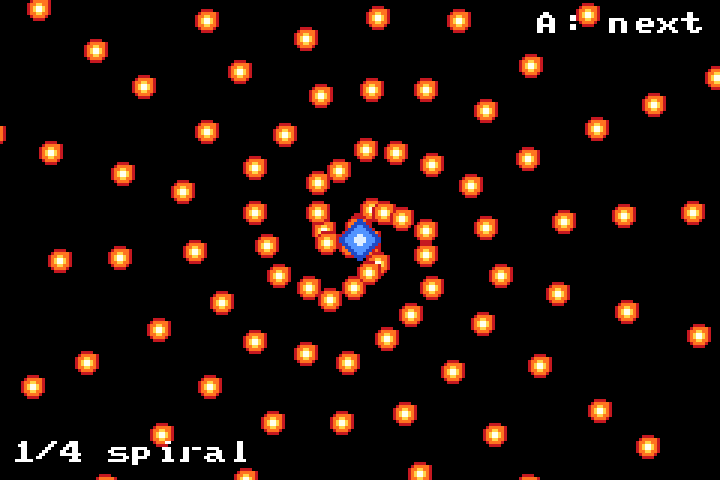
frame. Sampling the actual OAM contents through mGBA's debug stub, mid-run,
confirms it — the emitter (the round blue sprite at the center) sits
visibly in front of the spiral of bullets it just fired:
The three desktop backends (OpenGL, Vulkan, software) have no equivalent
hardware guarantee — draw order is the only ordering mechanism they
have — and the two systems simply registered in whatever order their
import code happened to call them, which put SpriteBatch after the
entity sprite system. Sampling actual framebuffer pixels at the emitter's
screen position, once every fifty frames of a real Vulkan run, shows
exactly the moment it stops working: the emitter's own blue for hundreds
of frames, then — once the bullet pool has enough live bullets to reach
that exact pixel — the pixel starts reading back as whatever bullet is
currently passing through it instead:
frame  350: 2850c8 5a96ff 5a96ff 5a96ff 2850c8   (emitter blue)
frame  750: 2850c8 5a96ff 5a96ff 5a96ff 2850c8   (emitter blue)
frame  800: c81e28 ff7828 ffdc50 ff7828 c81e28   (bullet red/orange)
frame 1200: c81e28 ffdc50 fffff0 ff7828 c81e28   (bullet, still)
The fix is the same one line of intent, spelled out explicitly instead of
left to registration order, on every desktop backend:
static const struct framer_system_dep batch_deps[] = {
    {.before = "sprite_render_system", .after = NULL}};

framer_system_register(world, "sprite_batch_render_system",
                        FRAMER_PHASE_ON_UPDATE,
                        sprite_batch_render_system, bq, batch_deps, 1);
A new renderer test pins this down the same way the fix does — a red
entity sprite and a white batch element occupying the same pixels, one
assertion that the pixel reads back red — so the ordering is now a
property the test suite checks rather than an accident of import order.
Verification: one bug per backend, so one check per backend
Nothing about the design change itself is backend-specific, so the actual
proof that the redesign works had to be, backend by backend, rather than
inferred from any one of them: the desktop pixel-readback tests
(software, OpenGL, Vulkan) each got their own pass through the same three
scenes, examples/bullets was cross-compiled for both GBA and NDS and
the resulting ROM's OAM contents were sampled through mGBA's debug stub —
the same technique the previous dithering article
used to catch its own hardware-only bug — and every GBA example ROM in
the tree was booted headlessly to confirm the pooled component-storage
change underneath all of this (a separate, smaller fix the redesign also
needed, since one more component pushed the fixed-stride storage layout
past EWRAM) didn't regress startup on anything else.
One number came out the same on every target it was checked on, which
wasn't the point of the exercise but is a reassuring sign the redesign is
actually target-neutral: with the pool's rotating spiral pattern running
continuously, the live bullet count settles in roughly the high 90s on
GBA, OpenGL and Vulkan alike, all three converging on the same rough
capacity for the same pattern despite three completely different drawing
paths underneath.
Where this goes next
FRAMER_STATIC_MAX_COMPONENTS (40) and FRAMER_STATIC_MAX_ENTITIES
(104, leaving 64 for actual game use) both grew slightly to make room for
the new component without pushing the pooled storage past EWRAM on GBA —
a two-line configuration change today, in a codebase where each of those
numbers has moved before and will again. The bullet-pool roadmap item
itself narrows to what's left once "draws correctly, everywhere" is no
longer the open question: measuring and documenting the actual per-target
bullet ceiling, rather than the two capacity constants
(examples/bullets currently uses 128 on GBA/NDS, 1024 on desktop)
picked ahead of having real numbers to size them against.
Introduction
The two previous GBA articles on this blog — one on cycle-level
optimization, one on the no-heap ECS underneath it — were both about working around
hardware that has no float unit and no polygon fill. This one is about a
narrower, older constraint on the same hardware: the GBA's Mode 4
framebuffer is 8bpp indexed, and its palette is a single, unbuffered,
256-entry table with no double-buffering and no VBlank gating on writes.
Reassigning a palette slot recolors every pixel already on screen using
that slot, immediately, mid-frame if the timing is unlucky.
That constraint alone rules out the obvious approach — blend per pixel,
allocate the blended color a palette slot on the fly — but even without
it, real blending wouldn't be affordable here. framer-engine's GBA
backend rasterizes 3D faces in software, on a 16.78MHz ARM7TDMI with no
hardware alpha unit anywhere in this path: the earlier article on cycle-
level optimization on this blog spent its
entire length shaving individual cycles off this same rasterizer's inner
loop. Blending would mean computing a source/destination color mix and
resolving it back to a palette index, for every covered pixel of every
translucent face, every frame — real per-pixel work on hardware that
has none of it to spare. Dithering sidesteps the cost entirely: the
per-pixel decision is a single threshold compare against a precomputed
matrix, no blend math and no palette search, so framer-engine answers
both constraints the same way plenty of retro-hardware renderers have —
translucent 3D faces aren't blended, they're dithered, drawn to roughly
the fraction of screen cells their alpha implies, using a fixed Bayer
matrix, so the density of drawn pixels approximates the alpha instead
of the color itself needing to change.
Note
framer-engine is a personal side project. The source code will be
made publicly available once the engine reaches a sufficient level of
maturity.
That part worked the first time. What didn't work — twice, in two
different ways, both only visible on real hardware — was making more
than one overlapping translucent object dither differently enough from
its neighbors to stay visible. This article is about both bugs, why the
second one is a quieter version of the first one, and why the fix that
finally stuck came from building three ROMs and looking at them, not from
finding a smarter formula.
The setup: one matrix, one offset per object
The dithering itself is a small, pure function. Given a matrix of
threshold values and a per-object "level" (roughly, alpha out of 16), a
pixel draws if the matrix value at that screen coordinate is below the
level:
static const unsigned char DITHER_BAYER_4X4[4][4] = {
    {0,  8,  2, 10},
    {12, 4, 14,  6},
    {3, 11,  1,  9},
    {15, 7, 13,  5},
};

static inline bool dither_should_draw(int x, int y, int level)
{
    return DITHER_BAYER_4X4[y & 3][x & 3] < level;
}
That's enough for one translucent object. It isn't enough for two.
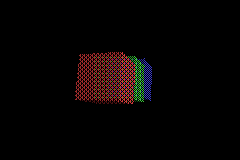
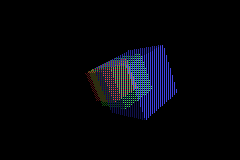
examples/translucent_cubes puts three overlapping cubes — red,
green, blue — at the same alpha, drawn back to front. With no per-object
variation, every one of them tests the same screen cells against the
same level, which means they all draw to the exact same pixels — and
since they're drawn back to front, the nearest one simply overwrites the
farther ones wherever they overlap, instead of the three visually
blending. Each object needs its own dithering phase: something that
makes its own draw-set genuinely different from its neighbors', while
each individual object still draws the right fraction of pixels.
Bug 1: shifting the coordinate collapses sixteen phases into two
The obvious way to give each object a phase is to shift the sampled
coordinate before indexing the matrix — object i looks up
BAYER[(y + py) & 3][(x + px) & 3] instead of BAYER[y & 3][x & 3],
for some per-object (px, py). Sixteen possible (px, py) pairs, one
matrix, sixteen apparently different phases. It shipped, passed its own
review, and looked right in the emulator during initial testing.
It did not look right in front of the user's own screenshots. With three
overlapping equal-alpha cubes, the middle one — green, sandwiched between
red and blue in draw order — was almost entirely invisible everywhere it
overlapped blue.
Direct enumeration of all sixteen shifts against the 4x4 matrix at the
alpha level in question found the cause immediately: only two
distinct draw-sets exist among all sixteen coordinate shifts, not
sixteen. The 4x4 Bayer matrix has its own translational symmetry — every
shift is equivalent, cell-for-cell, to some other shift of the same
parity of (px + py). Two objects landing in the same parity class
draw to identical cells, and whichever is nearer in the back-to-front
order simply erases the other. Three objects, two available parity
classes: one collision was mathematically guaranteed, not a rare edge
case.
The fix: rotate the compared value, not the sampled coordinate
The working version doesn't touch the coordinate at all. It rotates the
value read out of the matrix by a per-object offset, before comparing
it against the level:
static inline bool dither_should_draw(int x, int y, int level,
                                       int offset)
{
    return (int)((DITHER_BAYER_4X4[y & 3][x & 3] + offset) & 15) <
           level;
}
The difference isn't cosmetic. DITHER_BAYER_4X4 is a bijection —
every one of its sixteen cells holds a distinct value from 0 to 15. "Which
cells have (value + offset) mod 16 < level" selects a
level-sized contiguous arc of that value range, and as offset
sweeps 0 to 15, the arc's starting point sweeps every residue exactly
once. Sixteen offsets, sixteen provably distinct draw-sets, at every
level — not empirically distinct for the one alpha value that happened
to get tested, but distinct by construction, for the same reason a
Caesar cipher with sixteen different shift amounts produces sixteen
different ciphertexts of the same plaintext. This shipped, the green cube
reappeared, and the next report from real hardware was different in
kind: not invisible, just rougher-looking than the other two.
Bug 2: only two offsets out of sixteen are actually smooth
"Rougher" turned out to be exact, not impressionistic. At the alpha
level examples/translucent_cubes uses, offset 0 produces a perfect
alternating checkerboard:
offset=0                     offset=1
#.#.#.#.                     #.#.#.#.
.#.#.#.#                     .#.#.#.#
#.#.#.#.                     #.#.#.#.
.#.#.#.#                     .#.#.#.#
Only one other offset (8, exactly half the matrix's sixteen values away)
produces the other perfect checkerboard, disjoint from offset 0's.
Every offset in between is a near-miss: the same pattern with a handful
of cells flipped, visibly less regular the farther the offset sits from
0 or 8. Three overlapping objects need three distinct offsets to stay
correctly visible — that part was already fixed — but with only two
"perfect" offsets available in a 16-value matrix, the third object is
mathematically forced onto a visibly irregular one. Not a bug in the
value-rotation fix; a structural property of a matrix this small
combined with needing three simultaneously-distinct patterns.
A bigger matrix buys a finer gradient, not an exemption
Growing the matrix to 8x8 (64 distinct values instead of 16) doesn't
remove the "only two perfect offsets" property — it can't; the argument
above doesn't care about matrix size. What it buys is a much finer
gradient around those two perfect points, so a third offset near
either one looks close to perfect instead of visibly broken. The
external contract stayed untouched: callers still pass a level from 0
to 16, unchanged, with the comparison internally rescaled by a factor of
4 to land on the 8x8 matrix's 0-63 range:
static inline bool dither_should_draw(int x, int y, int level,
                                       int offset)
{
    return (int)((DITHER_BAYER_8X8[y & 7][x & 7] + offset) & 63) <
           level * 4;
}
This shipped as a real improvement — the third cube went from
"noticeably wrong" to "close to right." It was also, it turned out, not
actually fixing the thing that mattered.
The bug the roughness metric couldn't see
The offsets fed to each object weren't picked arbitrarily; they came from
a 64-entry table, ranked by how close each individual offset's own
pattern was to a perfect checkerboard — offset 0 first, offset 32
(the 8x8 matrix's other perfect point) second, then the next-closest
offsets after that. For three simultaneously-visible objects, that table
handed out 0, 32, 1.
Offset 1 is, individually, an excellent choice — its own pattern is
almost perfectly checkerboarded, one flipped cell out of sixty-four. The
ranking wasn't wrong about that. What it never asked is a different
question: how much does offset 1's draw-set overlap offset 0's? The
answer is 31 of 32 drawn cells, identical. The third object was, once
again, drawing to almost exactly the same pixels as the first one — the
original bug, wearing a much better disguise, because "individually
smooth" and "well separated from your neighbors" turned out to be two
different properties the same ranking had been quietly conflating.
Testing three sequences instead of guessing
Fixing the separation problem analytically ran straight into a genuine
trade-off, not a formula. Offsets chosen purely to maximize separation
from each other — evenly spread around the matrix's 64-value range —
land on values like 16 and 48, and those render as perfectly regular
vertical or horizontal stripes instead of checkerboard noise:
offset=1 (roughness-ranked)      offset=16 (separation-first)
#.#.#.#.                         #.#.#.#.
.#.#.#.#                         #.#.#.#.
#.#.#.#.                         #.#.#.#.
.#.#.#.#                         #.#.#.#.
#.#.#.#.                         #.#.#.#.
.#.#.#.#                         #.#.#.#.
#.#.#.#.                         #.#.#.#.
#..#.#.#                         #.#.#.#.
The stripe pattern shares only 16 of 32 cells with its neighbors instead
of 31 — a real, large improvement by the numbers — but axis-aligned
stripes are a textbook example of a dither pattern that's more
noticeable than diagonal checkerboard noise, not less, on real display
hardware. Whether that trade-off actually looks better than the original
near-miss checkerboard isn't something more computation could answer.
So the answer came from building three complete 64-entry offset
sequences — the original roughness-ranked table, a separation-maximizing
one (a bit-reversal permutation, also known as a Van der Corput
sequence: entry i is the 6-bit binary reversal of i, which
guarantees every prefix of the sequence is evenly spread around the
offset range), and a capped-overlap middle ground — compiling all three
into real translucent_cubes.gba ROMs, and testing them in mGBA. The
separation-maximizing sequence won, stripes and all.
static const unsigned char GBA_DITHER_OFFSET_SEQUENCE[64] = {
    0,  32, 16, 48, 8,  40, 24, 56, 4,  36, 20, 52, 12, 44, 28, 60,
    2,  34, 18, 50, 10, 42, 26, 58, 6,  38, 22, 54, 14, 46, 30, 62,
    1,  33, 17, 49, 9,  41, 25, 57, 5,  37, 21, 53, 13, 45, 29, 61,
    3,  35, 19, 51, 11, 43, 27, 59, 7,  39, 23, 55, 15, 47, 31, 63,
};
Verifying a change with nothing to count
The GBA performance article on this blog leaned on cycle_probe.py for
every claim — a deterministic cycle count, diffed between builds. None of
that applies here: this is a pure output-correctness question, not a
performance one, and the actual measurable claims are combinatorial
rather than empirical. Every mechanism change in this story — the
value-rotation fix's sixteen-provably-distinct-draw-sets claim, the 8x8
matrix's exact-count-at-every-level-and-offset property, the bit-reversal
sequence's even-prefix-spread property — was verified by direct
construction in Python before being written as C: enumerate every
offset, every level, every pair, and check the property holds for all
of them, not just the one case that happened to get tested by hand.
Beyond that: the full desktop test suite, a GBA cross-compile, and a
headless mGBA run of examples/translucent_cubes on every change, plus
— for the final offset-sequence choice specifically — actually looking
at the rendered result, which is the only step in this whole chain that
caught the thing the math couldn't.
Where this goes next
The bit-reversal sequence is still one fixed, precomputed table, shared
across every scene — it optimizes pairwise separation for a sequence
of offsets, not jointly for whichever specific set of objects happens to
be simultaneously overlapping in a given frame. For the realistic case
this backend actually renders — a small, fixed handful of translucent
objects — that's enough. A scene with many more simultaneously-visible
translucent objects than any current example has would eventually
exhaust the sequence's best-separated entries and reach ones no better
than the original bug. Jointly optimizing offset assignment across the
actual in-use set, per frame, is the natural next piece if that ever
stops being hypothetical — and, going by how this story went twice
already, probably has its own hardware surprise waiting inside it.
Introduction
The previous two articles on this blog — one on cycle-level
optimization, one on the no-heap ECS underneath it — were both about the Game Boy
Advance: an FPU-less CPU with no hardware polygon fill at all, where
every trick is about avoiding soft-float calls and touching as few VRAM
bytes as possible. The Nintendo DS backend in framer-engine
is the opposite kind of retro target — it has a real fixed-function 3D
GPU, with hardware transform, lighting, and rasterization. That sounds
like it should make lighting the easy part. It doesn't. It just moves
the constraint from "the CPU can't do float math" to "the GPU can't do
the thing you're asking it to do, and it won't tell you that — it'll just
render something else instead."
This article is about chasing exactly that down: a real rendering bug, a
real hardware surprise straight out of GBATEK, and a fix that gets
meaningfully closer to real point-light falloff without ever abandoning
the GPU's own lighting hardware for a software fallback.
Note
framer-engine is a personal side project. The source code will be
made publicly available once the engine reaches a sufficient level of
maturity.
The hardware constraint that drives everything
Every light in framer-engine — directional, point, or spot — is the same
struct light component, and every backend (GBA's software rasterizer,
desktop OpenGL/Vulkan/software, and this one) is expected to shade point
lights with real distance falloff: the closer an object is, the brighter
it gets, fading to nothing at the light's configured range. The DS's own
hardware lighting docs rule that out before any code gets written.
libnds's glLight():
void glLight(int id, rgb color, v10 x, v10 y, v10 z)
Only parallel light sources are supported on the DS
Four hardware light slots, each one a color and a direction vector — no
position, no range, no falloff term anywhere in the API. The DS's GPU
computes real per-vertex Lambertian shading (N·L) against those four
directions entirely in fixed-function hardware, at zero CPU cost per
triangle — genuinely excellent, for a directional light. A point light,
on this hardware, can only ever be an approximation: pick a direction,
accept that "distance" isn't a thing the lighting unit knows about, and
find whatever ways are still available to make that approximation better
without leaving hardware lighting behind entirely for a per-vertex
CPU-side shading pass (which the DS's ARM946E-S can do, but which throws
away the entire reason to use the GPU's fixed-function path in the first
place).
Bug 1: an ambient floor that was zero on purpose
Before any of the point-light work, the hardware 3D path had a simpler
problem: GL_AMBIENT — the DS's material property for "the color when
a face isn't catching any light at all" — was set to black,
unconditionally, the instant any Light entity existed in the scene:
/* what shipped, briefly */
glMaterialf(GL_AMBIENT, RGB15(0, 0, 0));
glLight() only lights a face whose normal faces toward one of the
four active directions — anything else gets zero contribution from
diffuse, and with GL_AMBIENT pinned to black, zero contribution from
ambient too. The result: any face pointing away from every active light
rendered as pure, flat black, on hardware that was otherwise correctly
shading everything facing the right way. The fix looked simple —
accumulate every ambient/directional light's color into a running sum
each frame, and feed that into GL_AMBIENT instead of a hardcoded
zero:
s_ambient_r += gl->r;
s_ambient_g += gl->g;
s_ambient_b += gl->b;
/* ...clamped to 1.0 after the loop, then: */
glMaterialf(GL_AMBIENT,
    RGB15((int)(r * s_ambient_r * 31.0f), /* ...g, b... */));
It rendered correctly with exactly one active light. It did not render
correctly with two.
The hardware surprise: ambient is summed once per active light
Adding a second point light to the scene — the natural next step, since
the whole point of this work was to support more than one — turned every
previously-correctly-shaded face white. Not brighter: blown-out,
clipped-to-white white, on geometry that had looked exactly right a
commit earlier.
The cause is in GBATEK's own description of the DS's polygon lighting
equation, easy to miss because nothing in libnds's glMaterialf() doc
comment mentions it: the hardware doesn't compute MaterialAmbient
once and add it to the final result. It computes MaterialAmbient ×
LightColor, separately, for every currently active light, and sums
those. Diffuse and specular are supposed to work that way — that's how
multiple colored lights are meant to combine — but ambient, conceptually,
is "the floor when nothing is lighting this face," and nothing about that
concept should scale with how many lights happen to be turned on. The DS
hardware doesn't make that distinction. Set GL_AMBIENT to the value
you actually want as a floor, and with three active lights, the hardware
hands you back three times that, added into every face's final color.
The first attempted fix was the obvious one: divide by the number of
active lights before setting GL_AMBIENT, so the hardware's own
summation would reconstruct roughly the intended value.
/* looked right, wasn't */
float ambient_scale = 1.0f / (float)s_num_lights;
This fixed the two-point-light overexposure. It also made a sphere lit by
one dim ambient light and two much brighter colored point lights render
far too dark — because a flat 1/N correction has no way to know that
those three active lights aren't equally bright. It divides down a lone
dim ambient contribution by exactly as much as it divides down two point
lights that have nothing to do with the ambient floor at all. A cube's
few flat faces happened to look fine anyway (whichever face caught a
point light's direction was still bright from diffuse); a sphere's curved
surface — mostly not facing any of the three light directions — was
left with almost nothing but that over-divided ambient term, and rendered
close to black again, just from a different arithmetic mistake than
bug 1.
The actual fix reconstructs the target ambient exactly, not
approximately: track the real per-channel sum of every active light's own
color (not just the count of lights), and divide by that instead.
/* MaterialAmbient * sum(LightColor) == target once hardware sums it
 * back, regardless of how many lights are active or how bright any
 * one of them is. */
float ambient_scale_r = 1.0f / fmaxf(s_light_color_sum_r, 0.05f);
glMaterialf(GL_AMBIENT,
    RGB15((int)(r * amb_r * ambient_scale_r * 31.0f), /* ...g, b... */));
Since MaterialAmbient × sum(LightColor) is exactly what the hardware
computes internally, setting MaterialAmbient = target / sum(LightColor)
makes the hardware's own summation land back on target — no matter
how many lights are active or how differently bright each one is. The
fmaxf(..., 0.05f) floor matters for a real edge case this reasoning
otherwise misses entirely: if every active light has an exact 0 in
one color channel (a pure-hue light, easy to reach — a pure green point
light has no red or blue component at all), the sum for that channel is
genuinely zero, and no MaterialAmbient value can make hardware
produce a nonzero result by multiplying against a color that has none.
Flooring the divisor doesn't fully fix that case — the DS hardware
mathematically cannot recover a floor for a channel no active light
contributes to — but it keeps the reconstruction from returning inf
and cascading into garbage the moment a scene reaches for a light whose
color isn't already a happy accident of "has something in every channel."
RGB555 has an opinion about how bright "bright enough" is
With the arithmetic fixed, faces pointing away from every light were no
longer wrong — just still visually indistinguishable from unlit black
in a real screenshot. RGB555 gives each channel 5 bits, 32 steps; a first
ambient floor of 0.18 on a 0.8-albedo material works out to roughly
0.8 * 0.18 * 31 ≈ 4/31 — technically nonzero, comfortably lost to
ordinary display gamma and contrast. Raising the floor to 0.45 reaches
roughly 11/31, about 35%: the difference between "the math is
correct" and "a person looking at the screen can tell the math is
correct." Getting the equation right and getting the number right turned
out to be two separate bugs, not one.
Real per-object falloff, without leaving hardware lighting
With the ambient floor actually behaving, the remaining problem was the
one this article opened with: point lights, as hardware directional
lights, weren't just "no falloff" in the abstract — the direction itself
was computed once per frame, not per object, from the world origin:
/* once per frame, not once per object */
float lx = gl->x, ly = gl->y, lz = gl->z; /* the light's position */
/* ...normalize (lx, ly, lz) as a direction from the origin... */
glLight(s_num_lights, hw_color, dx, dy, dz);
Every object in the scene, regardless of where it actually sat relative
to that light, saw the identical direction and the identical brightness,
with no falloff at all. A "point" light behaved exactly like a directional one
from every single object's point of view — which is a stronger
regression than the hardware's own real limitation demands. The DS
genuinely cannot do per-pixel or per-vertex-across-one-object falloff
for a point light; it can absolutely do a different, correct direction
and brightness for each separate object, if something recomputes those
per object instead of once for the whole frame.
That's the fix: move the glLight() upload from once-per-frame to
once-per-object, called right before that object's own triangles submit,
computing real direction and falloff from that object's actual world
position:
static void nds_upload_lights_for_object(const float pos[3])
{
    for (int i = 0; i < s_num_lights; i++) {
        /* ...ambient/directional lights reuse the once-per-frame
         * direction/color computed earlier -- no position to react
         * to, so recomputing per object would be pure waste... */
        float lx = gl->x - pos[0], ly = gl->y - pos[1], lz = gl->z - pos[2];
        float d2 = lx * lx + ly * ly + lz * lz;
        float atten = 1.0f - d2 * gl->inv_range2; /* same falloff every backend uses */
        /* ...clamp atten to [0, 1], normalize (lx, ly, lz), scale color by atten... */
        glLight(i, hw_color, dx, dy, dz);
    }
}
An object near the light now renders bright; an object near the edge of
its range renders dim; an object outside the range entirely gets nothing
from it — a real approximation of point-light falloff, per object,
running through the exact same hardware N·L diffuse calculation the
GPU always did. Nothing about the triangle count, vertex count, or
rasterization work changes even slightly — this only changes the
values written into two hardware registers that were already being
written once per object either way.
It isn't free in the sense of costing literally zero CPU cycles — a
point light's direction still needs a square root to normalize, and that
now happens once per (point light, object) pair instead of once per
frame. But it's the same fixed-point sqrtf32/divf32 primitives
this code already used for the once-per-frame version, on a scene with a
handful of lights and a handful of objects — a few extra fixed-point
operations, not a new soft-float cost, and not one more vertex for the
GPU to transform or one more pixel for it to fill. Against the cost of
submitting an object's actual geometry at all, it doesn't move the
needle, which is the only sense of "free" that was ever on the table for
a change like this.
Two smaller wins that came out of the same pass
Two more things fell out of looking this closely at the hardware
lighting path, neither one changing a single triangle:
GL_ANTIALIAS was already enabled at startup, and doing about half of
its job. The DS only blends an edge under antialiasing where the polygon
ID changes across it — and every object in the scene defaulted to the
same ID (0), so hardware edge smoothing only ever applied where an
object's silhouette met the background. Two overlapping objects, sharing
the same ID, got a hard edge between them regardless. Assigning each
object its own ID (an index mod 63, since glClearPolyID(63) reserves
63 for the backdrop) makes that blending apply between objects too — a
different bitmask, OR'd into a glPolyFmt() call that already happens
once per object, at the same cost as before.
And the built-in sphere/cone mesh, generated at 12 sectors × 6 stacks
(120 triangles), was sized for a target this GPU isn't. That segment
count lives in a comment noting the DS's real per-frame budget is "on the
order of a couple thousand polygons" — a 360-triangle sphere at 20×10 is
still a rounding error against that, and visibly rounder on screen, for a
target whose real constraint was never triangle count in the first
place.
Update: the tessellation win had a hidden cost
That "visibly rounder on screen" sphere from the section above had a
cost this article didn't account for at the time. examples/lighting
quietly ran at exactly 30fps on real NDS timing (melonDS) rather than
60, and the cause traced straight back to this same pass.
nds_submit_tri() — the function issuing each triangle's vertices —
was also where every triangle's GL_AMBIENT/GL_DIFFUSE material
state got (re)computed, including the full ambient-reconstruction
division this article spent three sections on above. For a single-color
object that's pure waste: the material state is identical across every
one of an object's triangles, so it only ever needs setting once per
object, not once per triangle. A 12×6 (120-triangle) sphere issued 120
redundant glMaterialf() pairs into the GX FIFO every frame even
before this article's own change; the same sphere at 20×10 (360
triangles, the tessellation bump described above) issued 360. Combined
with the lighting example's four active lights — each one re-triggering
that same reconstruction math on every single one of those calls — frame
time crept just past one VBlank period.
swiWaitForVBlank() doesn't degrade gracefully when that happens. It
waits for the next VBlank interrupt after the frame's work completes,
full stop — there's no "a little late" state between VBlanks, only "made
it" or "missed it and now wait for the one after." Missing a single
VBlank by any margin, even a fraction of a scanline's worth of GX FIFO
backlog, halves the observed frame rate outright: 60fps to exactly
30fps, not 59 or 58. The tessellation bump didn't cause a gradual
slowdown that could be spotted incrementally — it silently sat under the
VBlank deadline until it didn't, and the frame rate cut itself exactly
in half the moment it crossed.
The fix has nothing to do with tessellation, lighting, or the ambient
math itself — all of that stays correct, unchanged. It's purely a matter
of when the material state gets written: once per object (or once per
face, only for the rare object whose faces genuinely have different
colors), immediately before that object's triangles submit, instead of
redundantly with every single triangle. The exact same
GL_AMBIENT/GL_DIFFUSE values land on the GPU either way — this
changes nothing about what gets drawn, only how many times the identical
FIFO command gets issued to say so.
This doesn't extend to the GBA backend: its software rasterizer computes
each face's final color directly in gba_lit_color_face(), with no
separate material/normal GPU state to redundantly reissue in the first
place — there's no equivalent waste to hoist out over there.
Confirmed on real timing (melonDS): back to a solid 60fps. The
underlying shape of the bug is the same one this whole article is
about — a GPU that will happily do exactly what's asked of it, at
whatever cost that actually carries, and won't warn you when two
separately reasonable changes (a rounder sphere, correct per-object
point-light falloff) compound into a cost neither one would have caused
alone.
Verifying a change with nothing to count
The GBA articles on this blog leaned on cycle_probe.py for every
claim — a deterministic emulator's own cycle counter, diffed between
frames, turning "did this help" into a yes/no number. None of that
tooling applies here, and that's not an oversight: this whole article is
about work that happens on the GPU's fixed-function pipeline, not the
ARM9's own cycles. There's no CPU-side cost to isolate with a breakpoint,
because there almost isn't one — the actual verification for this kind
of change is the build and test suite (native, GBA, and NDS cross builds,
all passing unchanged throughout), plus looking at the actual rendered
frame in melonDS to confirm the sphere in examples/lighting is now
visibly shaded by two differently-colored, differently-positioned lights
instead of one flat approximation. Different kind of hardware, different
kind of proof.
Where this goes next
The DS's fixed-function GPU has real capabilities this backend still
doesn't touch at all: hardware texture sampling from VRAM, a specular
shininess table, per-vertex fog. None of those are CPU-cost questions —
they're GPU features sitting unused, the same shape of opportunity this
article's point-light work turned out to be. The natural next piece,
given how this one went, is real diffuse texturing: the highest-value use
of hardware this backend doesn't ask anything of yet, and — if the
pattern from the ambient bug repeats — probably has its own GBATEK
surprise waiting to be found the same way this one was, by trying the
obvious thing first and actually looking at what came out the other end.
Introduction
The previous article on this blog was about
squeezing cycles out of framer-engine's GBA renderer. This one is about
something that has to be settled before any of that renderer work is
possible at all: how do you run an Entity Component System — the
architecture pattern the whole engine is built around — on a console with
32KB of fast RAM, 256KB of slow RAM, no operating system, and no
malloc() you can lean on?
framer-engine's answer is a second, much smaller ECS implementation
living behind the same interface as the desktop one. Every game-logic
line — component definitions, systems, queries — is identical between a
PC build and a GBA build. Only one file differs: which world.c gets
linked in.
Note
framer-engine is a personal side project. The source code will be
made publicly available once the engine reaches a sufficient level of
maturity.
Two ECS backends, one interface
framer-engine's default ECS backend is Flecs, a full-featured ECS used
for desktop and handheld targets with a real OS underneath (PSP, 3DS,
Switch, PC). Flecs is excellent at what it does — archetypes, queries,
observers, relationships — but all of that bookkeeping assumes a working
heap it can grow and shrink as entities and component types come and go.
That's simply not available on a target like the GBA: 32KB of IWRAM,
256KB of EWRAM, both fixed-size and fully accounted for from the moment
the ROM boots, with no MMU and no OS to page anything in. There's no heap
to assume.
Rolling a second full-featured ECS to fit that budget wasn't the
answer either — that's a lot of complexity to maintain for a problem
that doesn't need it. What GBA-class scenes actually look like is a
handful of objects (examples/simple_cube uses one mesh and a camera;
examples/spinning_shapes uses three), not thousands, and the
component types are known and fixed at compile time, not user-extensible
at runtime. That's a much smaller problem than "general-purpose ECS,"
and src/ecs/static/world.c — about 550 lines of plain C — is sized to
match it instead of to match Flecs:
/* Entities */
static bool s_alive[FRAMER_STATIC_MAX_ENTITIES];
static uint64_t s_comp_mask[FRAMER_STATIC_MAX_ENTITIES];

/* Component data store: row = component slot, column = entity slot.
 * Each entity slot is FRAMER_STATIC_MAX_COMPONENT_SIZE bytes wide. */
static uint8_t s_store[FRAMER_STATIC_MAX_COMPONENTS]
                       [FRAMER_STATIC_MAX_ENTITIES *
                        FRAMER_STATIC_MAX_COMPONENT_SIZE];
Every one of those arrays is a fixed-size global, sized by compile-time
constants. There is no framer_entity_create() call anywhere in this
file that can fail by running out of memory in some unpredictable way —
it can only fail by running out of array slots, a number known before
the program even starts.
Both backends sit behind the exact same include/framer/ecs.h —
framer_world_t, framer_component_register(), framer_query_create(),
framer_system_register(), the FRAMER_GET/FRAMER_SET/FRAMER_FIELD
macros. A component defined with FRAMER_COMPONENT_DEFINE(Velocity) and
a system registered with framer_system_register() compiles and runs
unchanged on either backend; which one a build gets is a single Meson
option, -Decs=flecs or -Decs=static, and GBA's cross file pins it
to static (Flecs needs an OS, and bare-metal GBA doesn't have one) —
the build refuses to configure any other way for that target.
Entities are array slots, nothing more
An entity in this backend isn't an object — it's a 1-based index into
those parallel arrays. framer_entity_create() finds the lowest dead
slot and claims it, first-fit:
framer_entity_t framer_entity_create(framer_world_t *world)
{
    int i;

    for (i = 0; i < FRAMER_STATIC_MAX_ENTITIES; i++) {
        if (!s_alive[i]) {
            s_alive[i] = true;
            s_comp_mask[i] = 0;
            if (i + 1 > s_entity_high)
                s_entity_high = i + 1;
            return EID(i);
        }
    }
    return 0; /* pool exhausted */
}
That's the entire allocator. No free list to maintain, no fragmentation
to worry about — there's nothing to fragment when every slot is the same
fixed size and lives at a compile-time-known address. The price for that
simplicity is explicit and deliberate: destroying entity 5 and creating a
new one immediately afterward hands back the same ID, 5, for a
completely different logical entity. There's no generation counter to
tell the two apart. For the scene sizes and lifetimes this backend
targets — a handful of objects that mostly live for the whole level, not
a churn of thousands spawning and despawning every frame — that's an
acceptable trade, not an oversight; it's directly covered by a unit test
(test_entity_slot_recycled_first_fit) precisely so it stays a known,
intentional property instead of a surprise.
Components: a bitmask and a flat array
Each entity slot carries one uint64_t bitmask, one bit per registered
component type. framer_component_set() is a memcpy into a
fixed-stride row of the flat s_store array, plus a bit set:
void framer_component_set(framer_world_t *world, framer_entity_t e,
                          framer_id_t id, const void *data)
{
    int ei = EIDX(e);
    int ci = cidx(id);
    /* ...bounds and liveness checks elided... */
    memcpy(&s_store[ci][ei * FRAMER_STATIC_MAX_COMPONENT_SIZE], data,
           s_comp[ci].size);
    s_comp_mask[ei] |= ((uint64_t)1u << ci);
    s_any_mask |= ((uint64_t)1u << ci);
}
A query is just a precomputed mask built from the component ids it asks
for; matching an entity against it is one AND and one comparison
((s_comp_mask[ei] & mask) == mask). The uint64_t bitmask is also
the hard ceiling on how many distinct component types can exist in one
world — 64 — which is generous for a retro scene's needs but means the
type system itself enforces "don't try to build something Flecs-shaped
on top of this."
War story: a silent NULL deref vs. a loud abort()
The single most important property of this backend isn't the data
layout — it's what happens when a limit is hit. Early on,
framer_component_register() returned 0 when a component was too big
or the registry was full, the same "just signal failure" convention used
everywhere else in this API. That sounds reasonable until you trace what
a 0 component id actually does downstream: framer_query_create()
silently skips it when building a query's mask, and the system that
registered that query goes on to call FRAMER_FIELD() for a field that
was quietly dropped — which dereferences NULL on the system's very next
matching entity. That's exactly what happened on a real GBA build: a
Text component at 288 bytes against a 64-byte cap, and 17 registered
component types against a cap of 12. The crash that surfaced wasn't "your
component is too big," it was a NULL-pointer SIGSEGV deep inside a render
system, two layers removed from the actual mistake.
The fix removes the silent path entirely:
if (size > FRAMER_STATIC_MAX_COMPONENT_SIZE) {
    fprintf(stderr,
        "framer_component_register: \"%s\" is %lu bytes, "
        "exceeding FRAMER_STATIC_MAX_COMPONENT_SIZE (%d)\n",
        name ? name : "?", (unsigned long)size,
        (int)FRAMER_STATIC_MAX_COMPONENT_SIZE);
    abort();
}
abort() rather than an assert() or a GCC/Clang-specific builtin,
because this backend also has to compile under cc65 and SDCC for
8-bit targets — plain C89 abort() is the one failure primitive
guaranteed to exist everywhere this code runs. The test suite verifies
the contract, not just the arithmetic: test_ecs_static_limits.c
forks a child process, registers one component past the limit inside it,
and asserts the child died of SIGABRT rather than returning normally
— proving the fail-loud path actually fires, not just that the size
check's math is correct.
The broader lesson generalizes past this one bug: on a backend built
entirely out of fixed-size arrays, every hard limit is a wall, not a
suggestion. The only choice that matters is whether you hit that wall
with a clear error message at the exact call site that caused it, or
with a corrupted query and a crash three function calls away. This
backend picked loud, on purpose, everywhere a hard cap exists.
Sizing the pools, and a second silent-failure bug
Each target's meson.build picks FRAMER_STATIC_MAX_COMPONENTS,
FRAMER_STATIC_MAX_ENTITIES, and FRAMER_STATIC_MAX_COMPONENT_SIZE
to fit what that platform actually needs — there's no universal default
that's right for every target, because the engine registers its full set
of core components (Transform, Velocity, Sprite, Light,
Text, Camera, and so on — 19 today) unconditionally, regardless
of whether a given example actually uses all of them:
# Embedded (system == 'none'):
-DFRAMER_STATIC_MAX_COMPONENTS=19
-DFRAMER_STATIC_MAX_ENTITIES=96
-DFRAMER_STATIC_MAX_COMPONENT_SIZE=64
That MAX_ENTITIES=96 number has its own bug story behind it. Each
registered component type — not each entity actually created — reserves
one sentinel slot out of the same entity pool, so the entities actually
available to a scene is MAX_ENTITIES minus however many component
types exist. At MAX_ENTITIES=64 and 19 components, that left 45 usable
slots — comfortably enough for examples/simple_cube, but one short of
examples/input_tester's 48 (47 on-screen panel entities plus one
camera). The failure mode was, again, silent: framer_entity_create()
returning 0 once the pool filled, and the caller that wanted one more
entity for a gamepad-axis label simply never got it — the text just never
appeared on screen, with nothing in the logs to say why. Raising the cap
to 96 (77 free after the 19 sentinels) fixed it with headroom to spare.
On the GBA build that growth costs about 544 bytes of IWRAM (three
per-entity arrays scale with the cap), which was checked against the
build's actual free IWRAM margin before landing — on a 32KB budget,
guessing isn't good enough, you measure.
That measurement habit is the same one from the performance article:
arm-none-eabi-size -A on a current GBA build shows exactly where this
backend's memory actually goes. The flat component store
(19 × 96 × 64 bytes ≈ 114KB) is placed in EWRAM's .sbss section — too
big for IWRAM, and zero-initialized for free by the startup code without
costing any ROM space:
#ifdef GBA
#define _FRAMER_STORE_ATTR __attribute__((section(".sbss")))
#else
#define _FRAMER_STORE_ATTR
#endif

static uint8_t _FRAMER_STORE_ATTR
    s_store[FRAMER_STATIC_MAX_COMPONENTS]
           [FRAMER_STATIC_MAX_ENTITIES * FRAMER_STATIC_MAX_COMPONENT_SIZE];
Everything else — the alive flags, the masks, the per-frame iterator's
entity list — is small enough to live in IWRAM, the GBA's fast 32KB
scratch memory, where the CPU actually wants its hot working data. On
the current examples/simple_cube build that's roughly 19.5KB of
IWRAM used out of 32KB, leaving real headroom for the next component or
two — a number worth checking again every time that count grows, the
same way the 96-entity fix had to be checked against it.
The scan loop, briefly
framer_world_progress() walks every registered system, in phase
order, and for each one scans entity slots up to the high-water mark
(s_entity_high, one past the highest slot any entity or component
sentinel has ever occupied) looking for bitmask matches. That scan, and
the sticky s_any_mask check that skips it entirely for systems whose
component type no entity has ever had, was the single biggest win in
the previous article's performance work — covered there in full, since
it's a perf story more than a design story. The design point that
matters here is simpler: this is a linear scan over a flat array, not a
sparse-set or archetype-table lookup. That's the right trade at GBA
scene sizes (tens of entities), and the wrong one at thousands — which is
exactly the line where you'd reach for Flecs instead.
What this design explicitly gives up
None of the above is free, and being upfront about the trade-offs is the
point of having two backends instead of pretending one ECS fits every
target:
- No entity generations. As covered above, IDs are recycled
immediately and look identical to the entity that previously held
them.
- No archetypes, no sparse sets. Matching is a linear scan with a
bitmask test, not a cache-optimized contiguous iteration over exactly
the matching entities. Fine at dozens of entities; the wrong tool past
that.
- 64 component types, total, forever, for the whole world. Not per
query — for every component type that exists anywhere in the engine,
shared across every system. The engine's current 19 leaves room to
grow, but a "just add a component" change always has a final cost
attached: someone, somewhere, has to recheck that ceiling.
- No relationships, no hierarchies, no observers. Flecs has all of
these; this backend has entities, components, and queries, deliberately
nothing more.
Every one of these is a real capability Flecs has and this backend
doesn't. They're also exactly the features that cost the heap, the
dynamic bookkeeping, and the unpredictable-at-compile-time memory use
that a bare-metal ROM target can't afford. The two-tier split exists so
that trade only has to be made once, explicitly, per target — not
silently, by whichever ECS happened to compile.
Where this goes next
The same problem — "no OS, no heap, fixed memory map, known component
set" — is true of every retro target on framer-engine's roadmap, not just
the GBA. The 32-bit-era consoles mentioned in the previous article's
closing section, starting with the PlayStation 1, sit in an interesting
middle ground: dramatically more RAM and a real GPU compared to the GBA,
but still no OS and still nothing resembling a desktop heap. The
expectation going in is that they'll want this same static backend, just
with much larger pool constants — not Flecs, and not a third ECS
implementation. Whether that expectation survives contact with an actual
PS1 build, the way the "obviously correct" tricks in the performance
article sometimes didn't survive contact with measurement, is exactly
the kind of thing a future article on this blog will have to report
honestly either way.
Introduction
framer-engine is a small cross-platform ECS game engine I've been
building, with backends ranging from desktop OpenGL/Vulkan down to bare
software rendering on 8/16-bit consoles. The Game Boy Advance backend
renders actual textured/shaded 3D meshes — cubes, cones, spheres — through
a CPU-only software rasterizer, on a 16.78MHz ARM7TDMI with no FPU and
no hardware polygon fill. Every float operation is a soft-float library
call, every divide is a library call, and every pixel is a CPU
read-modify-write into VRAM.
Note
framer-engine is a personal side project. The source code will be
made publicly available once the engine reaches a sufficient level of
maturity.
This article is about what it actually takes to make that fast — not in
theory, but measured. Every number below comes from
scripts/debug/gba/cycle_probe.py, a small script that sets a
breakpoint on the engine's vblank-wait function inside headless mGBA
and reads the emulator's cycle counter on every hit. mGBA's CPU emulation
is deterministic: the same ROM run with the same inputs produces
bit-identical cycle counts every time, which means an optimization claim
isn't "it looked smoother" — it's "frame N now costs X fewer cycles, every
single run." I discard the first ~100 frames as warm-up (caches, branch
predictor-equivalent effects, lazy first-frame setup) and average the
steady-state window after that.
That discipline matters more than any individual trick below, because
twice during this work an optimization that was obviously, mathematically
correct measured as a regression. More on that at the end.
The hardware constraint that drives everything
The GBA's display is locked to the LCD's scanout rate. A frame takes
exactly 280896 cycles of the system clock to display, whether or not
your CPU work fits inside it — if you go over, you just drop to displaying
every other frame (or worse), the displayed frame rate quantizing to
59.73 / n for whatever integer multiple of that budget your frame
actually costs. There's no "GPU" to defer to and no way to partially
miss the deadline gracefully. The entire optimization exercise is: get
the CPU-side frame cost under (or as close as possible to) 280896 cycles.
Every technique below exists because of two specific limits:
- No FPU. Any float/double arithmetic — multiply, divide,
sqrtf(), sinf()/cosf()/tanf() — compiles to a call into
ARM's soft-float runtime. That's not "slower than native float," it's
"a function call plus a software algorithm" for every single operation.
- No hardware rasterizer. Mode 4's bitmap layers are just VRAM you
write to with the CPU. Every triangle the software renderer fills is
pixels the ARM7TDMI itself has to compute and store, one at a time.
Technique 1: fixed-point math instead of float
The most foundational change is also the simplest to state: the hot path
(per-vertex transform, per-pixel rasterization) uses Q12 fixed-point
integers instead of float, via a small fix_t type
(src/backends/renderer/common/sw3d_fixed.h):
typedef int32_t fix_t;

#define FIX_SHIFT 12
#define FIX_ONE   (1 << FIX_SHIFT)   /* 4096 == 1.0 */

static inline fix_t fix_mul(fix_t a, fix_t b)
{
    return (fix_t)(((int64_t)a * (int64_t)b) >> FIX_SHIFT);
}
fix_mul's int64_t intermediate looks like it should be expensive,
but on ARM it lowers to a single hardware SMULL (signed multiply,
64-bit result) instruction — no library call, no precision tricks, just
the right type for the CPU's native multiply. Compare that to a
float * float, which on this target is a soft-float call doing
mantissa/exponent bookkeeping in software.
Division is the one place fixed-point still hurts, because there's no
hardware divider on the ARM7TDMI either way — fixed-point divide still
costs a library call (__aeabi_idivmod et al.), just an integer one
instead of a float one. The perspective-divide hot path exploits a
narrower fact about that specific division to cut its cost further:
/* fix_div()'s general implementation widens to a 64-bit intermediate to
 * stay correct for arbitrary numerators, but the perspective divide's
 * numerator is always FIX_ONE, so FIX_ONE << FIX_SHIFT never exceeds
 * 32 bits. */
static inline fix_t fix_reciprocal(fix_t b)
{
    return (fix_t)(((int32_t)FIX_ONE << FIX_SHIFT) / b);
}
That one change — replacing the general 64-bit fix_div() with a
32-bit-only reciprocal for the one call site where the numerator is known
to always be FIX_ONE — measured a ~50,000 cycle/frame saving on
examples/spinning_shapes, just from giving the divide routine a
narrower, cheaper problem to solve.
Technique 2: a LUT instead of sinf()/cosf()
framer_transform_get_matrix() (the shared, cross-platform transform
code) builds rotation matrices via cglm's glm_rotate_{x,y,z}(), which
call cosf()/sinf(). On desktop that's a couple of FPU
instructions; on the GBA it's a soft-float libm round trip, once per
axis, per object, per frame.
The GBA backend instead carries its own 256-entry sine table
(sw3d_raster.c), reading cosine from the same table at a quarter-turn
offset, with linear interpolation between samples:
static const fix_t gba_sin_lut[256] = { /* ... */ };

static void gba_fast_sincosf(fix_t angle_turns_256, fix_t *s, fix_t *c)
{
    int idx = angle_turns_256 & 0xff;
    int cidx = (idx + 64) & 0xff; /* cos(x) == sin(x + tau/4) */

    *s = gba_sin_lut[idx];
    *c = gba_sin_lut[cidx];
}
256 entries means ~1.4° between samples — far finer than visible on a
240x160 screen, so the linear interpolation error never shows up as
visible jitter. Swapping this in for the float sin/cos chain, measured
A/B (git stash + identical build/measure commands) on
spinning_shapes (which rotates 3 objects on all 3 axes every frame):
1,294,320 → 1,234,341 cycles/frame, a ~4.6% reduction, from removing
one class of soft-float call entirely.
A follow-up went further: rather than building the rotation matrix the
way cglm does — up to three separate generic 4x4 matrix multiplies, one
per nonzero Euler axis, each a 64-multiply-add matmul even though most
entries of a pure-axis rotation matrix are 0 or 1 — the combined
Rz·Ry·Rx product's 9 nonzero 3x3 entries are expanded by hand from the
three angles' sin/cos (still sourced from the LUT above) and folded into
the output with a single glm_mat4_mul instead of up to three:
/* out = Rz * Ry * Rx, 9 nonzero entries expanded by hand instead of
 * three generic 4x4 matmuls. */
out[0][0] = cy * cz;
out[0][1] = cy * sz;
out[0][2] = -sy;
out[1][0] = sx * sy * cz - cx * sz;
out[1][1] = sx * sy * sz + cx * cz;
out[1][2] = sx * cy;
out[2][0] = cx * sy * cz + sx * sz;
out[2][1] = cx * sy * sz - sx * cz;
out[2][2] = cx * cy;
This was verified against the original three-matmul path via NumPy
differential testing across all 8 zero/nonzero axis combinations plus
thousands of random angle triples (max absolute error ~1e-16) before it
ever touched the renderer. Measured gain: only 1,309,080 → 1,306,224
cycles/frame, ~0.22% — much smaller than the raw operation count
suggests, because the compiler's optimizer already folds away most of the
original chain's zero/one multiplies once each Rz/Ry/Rx factor
starts from an identity-seeded matrix. The lesson here isn't "this
technique didn't matter" — it's that hand-expanding math only pays for
itself once you've checked what the compiler was already doing for you.
A second, branch-free variant that skipped the matrix multiply
altogether (translation column copy + per-column scale) was also tried
and measured worse in every iteration than this simpler one-matmul
version — discarded in favor of what actually measures faster.
Technique 3: Quake III's fast inverse square root
Triangle shading needs each surviving triangle's world-space normal,
normalized — once per shaded triangle, per frame, in the single hottest
loop of the renderer. cglm's glm_vec3_normalize() calls sqrtf()
and then divides by it: two soft-float library calls per triangle.
The fix is the famous bit-hack:
static float sw3d_fast_inv_sqrt(float number)
{
    union { float f; uint32_t i; } conv = { .f = number };

    conv.i = 0x5f3759df - (conv.i >> 1);
    conv.f *= 1.5f - (0.5f * number * conv.f * conv.f); /* one Newton-Raphson step */
    return conv.f;
}
One magic-constant bit-shift gets a rough inverse-square-root estimate
straight from the float's IEEE bit pattern (no sqrt call at all), and one
Newton-Raphson correction step sharpens it to be visually indistinguishable
from the real thing for lighting purposes. Replacing both the sqrt and
the divide with this one function, used at every site in the GBA backend
that previously called glm_vec3_normalize() (face-normal lighting in
the renderer, and the rasterizer's own triangle-normal centroid
computation), removes two soft-float calls per triangle for one cheap
integer/float hybrid op.
Technique 4: an ECS dispatch early-out
Not every win is renderer-specific. framer_world_progress(), the ECS
scheduler's per-frame loop, walked every registered system's full entity
range every frame — including systems whose query needs a component type
that no entity in the scene has ever had. simple_cube registers
collider/velocity/rigidbody systems unconditionally on every platform
(component import is unconditional, regardless of whether the scene
actually uses them), so most of those systems were scanning entities every
frame only to match zero of them, every single time.
The fix tracks a sticky OR of every component bit ever set across the
world's lifetime, and skips a system's scan entirely — O(1), no entity
walk at all — whenever its query's required mask includes a bit outside
that set, which can provably never match:
/* s_any_mask: sticky OR of every component bit ever set across the
 * world's lifetime. A query whose mask requires a bit outside this set
 * can never match any entity — skip the per-entity scan entirely. */
if ((q->mask & world->s_any_mask) != q->mask)
    continue;
This is the single largest win found across the whole project:
simple_cube: 308650 → 288629 cycles/frame; spinning_shapes:
757806 → 744701 cycles/frame (both steady-state averages over frames
101-150). A scheduler-level fix, not a renderer trick, but it followed
from the exact same discipline: measure where the cycles actually go,
don't assume.
Technique 5: making divides Bresenham-shaped
The scanline rasterizer (sw3d_fill_triangle()/sw3d_fill_quad())
originally tested every pixel inside each triangle's bounding box against
all three edge functions to decide if it was inside. The replacement
computes each row's [lo, hi] x-span directly per edge, incrementally,
which is exactly Bresenham's line algorithm applied to "x as a function of
y" along a triangle edge:
/* Incrementally tracks bound(y) = floor((b0 + (y - y0) * d) / a) for a
 * fixed positive `a`, one row at a time, with zero divisions after
 * init. The GBA's ARM7TDMI has no hardware divider, so trading one
 * division per edge (at init) for what used to be a same-sign test on
 * every bounding-box pixel is the whole point. */
struct row_bound {
    long val, step, rem, err, a;
};
This turns "one division-equivalent test per candidate pixel" into "one
division per triangle edge, plus an integer add per row" — a meaningful
shape change on hardware with no hardware divider at all.
It also produced one of the more unusual micro-optimizations in the
codebase. The one division this scheme still needs per edge
(floordiv_pos()) is built on a / b and a % b in C, which GCC
is supposed to fuse into a single __aeabi_idivmod call when both are
needed. Disassembly showed that fusion happening on one branch
(a > 0) but not the other (a < 0, which negates both operands
first) — an extra, redundant __aeabi_idiv call alongside the
__aeabi_idivmod for the same division, confirmed to be a GCC
codegen quirk specific to that branch (restructuring the C source
produced byte-identical codegen either way, so it wasn't fixable from the
C side). The actual fix is to call the library function directly and
unpack its packed 64-bit r0:r1 quotient/remainder result by hand,
removing the compiler's latitude to make the wrong call-fusion choice at
all:
extern long long __aeabi_idivmod(long numerator, long denominator);

static long floordiv_pos(long a, long b)
{
    long long qr = __aeabi_idivmod(a, b);
    long q = (long)(uint32_t)qr;
    long r = (long)(qr >> 32);

    if (r != 0 && a < 0)
        q--; /* C truncates toward zero; floor() needs a -1 correction */
    return q;
}
Saved roughly 25,000-30,000 cycles/frame on spinning_shapes — for
removing one redundant library call the compiler was inserting on its
own, on one branch only, for no reason a compiler flag could fix.
Technique 6: let the hardware scale a smaller image
The GBA has no hardware polygon fill, full stop — every pixel the
rasterizer covers is a CPU read-modify-write into VRAM, which is the hard
floor under every other optimization in this list: at some point you've
removed every avoidable division and float op, and you're still bound by
"how many pixels does the CPU have to touch."
The way around that floor isn't a CPU optimization at all: Mode 4's BG2
background layer supports affine transforms even though it's a flat
bitmap — the same trick behind GBA titles that faked SNES Mode-7-style
scaling. The renderer draws only a 120x80 corner of the framebuffer (a
quarter the pixels of the real 240x160 screen) and lets BG2's affine
matrix stretch that corner across the full screen at scanout time, for
free, in hardware:
#if GBA_RENDER_SCALE == 1
static inline void gba_clear_buffer(vu16 *base) { /* full-res clear */ }
#else
static inline void gba_clear_buffer(vu16 *base)
{
    /* only clear the GBA_RENDER_WIDTH x GBA_RENDER_HEIGHT corner that's
     * actually sampled by BG2's affine matrix — the rest of the page is
     * never displayed, so clearing it is wasted work. */
}
#endif
On spinning_shapes this dropped steady-state cost from ~1.55M to
~1.28M cycles/frame — roughly 10.8fps → 13.1fps, a ~17% reduction —
at the cost of visibly blockier 2x-nearest-neighbor-scaled edges. It's
opt-in (-Dgba_half_res) rather than default, because unlike every
other technique here it's a genuine, visible quality trade-off rather
than a free win — worth calling out, since this whole article is
otherwise about zero-visual-cost changes.
The measurement discipline that makes any of this credible
None of the numbers above are estimates. scripts/debug/gba/cycle_probe.py
drives headless mGBA, sets a breakpoint on the engine's vblank-wait call
(the one point every frame reliably passes through exactly once), and
reads the emulator's own cycle counter on every hit. Because mGBA's CPU
core is a deterministic interpreter/JIT — not a real, jittery piece of
silicon — the same ROM, same breakpoint, same number of warm-up frames
discarded, produces bit-identical cycle counts on every run. That
turns "did this help?" from a vibes question into a yes/no one: rebuild,
re-run the probe, diff the number.
That discipline is also what caught the two times this project tried an
"obviously correct" optimization that wasn't.
War story 1: caching screen-space half-extents that never change
The camera's screen-space half-width/half-height, once converted to
fixed-point, don't change frame to frame unless the camera's projection
changes — so hoisting that fixed-point conversion out of the per-vertex
projection loop and caching it looked like a pure, free win: same
values, computed once instead of once per vertex.
It measured as a regression.
The likely cause, confirmed by inspecting the generated assembly rather
than guessing: this project builds with link-time optimization
(LTO) and -Doptimization=3 across the board, and LTO's inlining
heuristics are sensitive to function and loop size in ways that aren't
intuitive from the C source. Adding a cache check (even a cheap one) to
an already-hot, already-inlined loop changed the cost/benefit math the
inliner used elsewhere in the same translation unit, and the net effect
of removing unrelated, more valuable inlining outweighed the
arithmetic actually saved. The "obviously correct" loop-invariant hoist
was correct about the math and wrong about the measured outcome.
War story 2: skipping integration work for a zero velocity
The same pattern showed up again, independently, in
velocity_integration_system(). Most entities in simple_cube have
a Velocity component that's exactly zero every frame — adding a
zero-vector early-out before the glm_vec3_scale/glm_vec3_add calls
is mathematically a no-op (scaling and adding a zero vector changes
nothing), so it looked like free cycles for every entity that wasn't
actually moving:
/* tempting, and wrong on this build */
if (glm_vec3_isvalid(v->linear) && glm_vec3_norm2(v->linear) == 0.0f &&
    glm_vec3_norm2(v->angular) == 0.0f)
        continue;
Measured: +112 cycles/frame on simple_cube, +312 on spinning_shapes.
A regression, on a change with no behavior difference whatsoever. Same
root cause as the screen-extent cache: the early-out added code size and
a branch to a hot loop, LTO's inlining decisions shifted in response, and
whatever inlining was lost elsewhere cost more than the skip saved. It
was reverted in the same session it was tried, per the same rule that
caught it: measure before keeping, no exceptions for changes that "can't
possibly" make things worse.
The takeaway isn't "don't trust loop-invariant hoisting" or "don't trust
early-outs" — both are completely standard, usually-correct techniques.
It's that once a build is leaning on LTO and aggressive optimization
levels to do a lot of the heavy lifting, the compiler's own decisions
become part of the system you're optimizing, and they don't always move
in the direction your mental model of the code predicts. The only way to
know is the same cycle_probe.py round-trip used for every win in this
article: change one thing, measure, keep it only if the number actually
goes down.
War story 3: quantizing colors in the wrong number system
The GBA backend's shaded sprites and triangles go through
gba_palette_index(): a linear scan (up to 256 entries, with a nearest-
color distance calculation once full) that maps a computed RGB555 value
onto BG_PALETTE, since Mode 4 is 8bpp paletted, not true color. A
one-entry cache short-circuits two consecutive calls requesting the
exact same value — but continuous per-frame lighting math (examples/
lighting, added since this article's original techniques, orbits two
colored point lights around a static sphere and cube) makes each shaded
triangle request a slightly different value almost every frame, defeating
that cache and driving the palette to saturation within seconds.
The fix looked obvious: round each lit color channel to a coarser step —
16 buckets instead of RGB555's own 32 — before it ever reaches the
palette lookup. A gradually-changing light then collapses onto a much
smaller, more repeated set of values: more cache hits, and a palette that
stays truer to intent for longer before saturating. The first
implementation did this in float space, right where the lit color was
already a float:
/* looked free, measured otherwise */
static inline float gba_quantize_channel(float v)
{
    const float steps = 16.0f;
    return (float)(int)(v * steps + 0.5f) * (1.0f / steps);
}
Measured with cycle_probe.py on the same orbiting-lights demo, 150
frames, steady-state average over frames 101-150: 646528 cycles/frame
with no quantization at all, versus 658869 with it — a ~1.9%
regression, not the improvement it was meant to be.
The cause, once measured rather than assumed: this is still the same
FPU-less ARM7TDMI every other technique in this article exists to work
around. v * steps + 0.5f, the cast, and * (1.0f / steps) are three
more soft-float library calls, paid on every one of the three channels,
for every shaded triangle, every frame — and that cost was larger than
whatever palette-scan time it was saving. An optimization aimed
specifically at this hardware's constraint had itself ignored that same
constraint.
The fix moves the rounding into integer space instead, using a value the
code already computes. f_to_5bit() (the existing float→RGB555-channel
helper) produces a clamped 0-31 integer; masking off its low bit gives 16
buckets — the identical bucket count as the float version — for the cost
of one AND on a value that has to be computed either way:
static inline u16 f_to_5bit_quantized(float v)
{
    return (u16)(f_to_5bit(v) & ~1u);
}
Same demo, same steady-state measurement: 642455 cycles/frame — a
genuine, if modest, ~0.63% improvement over the no-quantization
baseline. The idea behind the optimization was sound; it just had to be
expressed in a number system this CPU can actually multiply in for free.
Where this leaves things
After all of the above, examples/simple_cube sits at 288074
cycles/frame — 16777216 / 288074, the same ratio cycle_probe.py
itself reports for every measurement in this article — works out to
~58.24fps, against a true-60fps budget of 280896 cycles (~59.73fps).
That's about 2.5% over budget, down from a starting point of roughly
7-8% over before this round of work. spinning_shapes — three fully
shaded objects rotating on all three axes every frame, a heavier scene
by design — sits at 741378 cycles/frame, ~22.63fps. Both are ceilings
for these specific demo scenes on real, cycle-accurate emulation, not
estimates: add more triangles or lights to either scene and the
frame cost (and fps) moves accordingly. Closing the rest of that gap on
simple_cube would mean moving into riskier
territory: caching ECS query results across frames (not just the
existence-of-any-entity check from Technique 4), or pre-converting mesh
vertex data to fixed-point ahead of time instead of per-vertex at raster
time — the latter complicated by the fact that the same mesh struct is
also populated through framer-engine's public, float-only custom-mesh
API, so caching it would mean either changing that API or building a
runtime cache-on-first-use scheme. Both are real options, just bigger
ones than "swap a divide for a multiply" — a good place to stop for now
and pick back up deliberately, rather than rush into more soft-float
removal for diminishing, harder-to-verify returns.
What's next
The GBA backend was the first proof that framer-engine's "real ECS, real
3D, software-rendered, no FPU" approach actually holds up on constrained
hardware. The next targets are mainly a step up in capability rather than
a step down: 32-bit-era consoles like the PlayStation 1, and handhelds
with genuine 3D hardware acceleration — PSP, Nintendo DS, and 3DS. That
side of the plan is mostly for fun: getting framer-engine to a point
where it's genuinely pleasant to build small demos and little indie games
on real retro hardware, GBA included.
But at least one of those targets — most likely the PSP, the one with the
most conventional FPU-plus-GPU setup of the group — is also there for a
different reason. Every technique in this article exists because the
GBA has no FPU and no hardware rasterizer; on a platform that has both,
none of those specific tricks apply, and the interesting question flips
from "how do I avoid the hardware's weaknesses" to "how far can the
engine and the hardware actually go together, pushed deliberately to
their limits, with the GPU and FPU doing what they're meant to do."
That's a different kind of optimization work — closer to traditional
real-time-3D budgeting (draw calls, vertex throughput, fill rate) than
to soft-float avoidance — and it needs the same measurement discipline as
everything above, just pointed at a different bottleneck. Whether the
specific tricks in this article carry over at all won't be clear until
that work actually starts; future articles will cover whatever turns out
to be that generation's equivalent surprise.
Understanding the hardware capabilities of classic gaming consoles
provides valuable insight for both homebrew developers and retro gaming
enthusiasts. Each console generation brought significant improvements in
processing power, graphics capabilities, and audio quality, while
working within tight memory constraints and power budgets.
This guide provides detailed technical comparisons across multiple
console generations, from the 8-bit Game Boy to modern hybrid systems
like the Nintendo Switch. Whether you're developing homebrew games or
simply curious about the technical evolution of gaming hardware, these
tables offer a reference.
The processors and memory configurations of gaming consoles reveal much
about their capabilities and limitations. Early consoles operated with
kilobytes of RAM, while modern systems have gigabytes at their disposal.
| Console |
CPU |
Clock
Speed |
|---|
| Game Boy |
Custom Sharp LR35902 |
4.19 MHz |
| Game Boy Color |
Custom Sharp Z80 |
8 MHz |
| NES |
Ricoh 2A03 (MOS 6502) |
1.79 MHz
(NTSC) /
1.66 MHz
(PAL) |
| SNES |
Ricoh 5A22 (65C816-based) |
3.58 MHz
(max) |
| PC Engine |
HuC6280 (MOS 6502-based) |
7.16 MHz |
| Neo Geo |
Motorola 68000 + Zilog Z80 |
12 MHz +
4 MHz |
| Game Boy Adv. |
ARM7TDMI |
16.78 MHz |
| Nintendo DS |
ARM946E-S + ARM7 |
67 MHz +
33 MHz |
| Nintendo 3DS |
Dual-Core ARM11 MPCore |
268 MHz |
| Wii |
IBM PowerPC "Broadway" |
729 MHz |
| PSP |
MIPS R4000-based CPU |
333 MHz |
| Switch |
NVIDIA Tegra X1
(ARM Cortex-A57) |
1.02 GHz |
| Console |
RAM |
|---|
| Game Boy |
8 KB |
| Game Boy Color |
32 KB + 16 KB VRAM |
| NES |
2 KB + 2 KB VRAM |
| SNES |
128 KB + 64 KB VRAM |
| PC Engine |
8 KB + 64 KB VRAM |
| Neo Geo |
64 KB + 68 KB VRAM |
| Game Boy Adv. |
256 KB + 96 KB VRAM |
| Nintendo DS |
4 MB + 656 KB VRAM |
| Nintendo 3DS |
128 MB + 6 MB VRAM |
| Wii |
88 MB (24 MB + 64 MB GDDR3) |
| PSP |
32 MB (PSP-1000) / 64 MB (PSP-2000+) |
| Switch |
4 GB LPDDR4 |
Key Observations:
The evolution from kilobytes to gigabytes of RAM represents a
million-fold increase in memory capacity. The NES operated with just
2 KB of main RAM, requiring extremely efficient programming. Modern
consoles like the Switch have 4 GB, enabling complex 3D worlds and
high-resolution textures.
Early gaming consoles were built around dedicated 2D graphics hardware
with hardware sprites and tile-based rendering systems.
| Console |
Graphics Processor |
Displayable Colors |
|---|
| Game Boy |
Custom Sharp LR35902 |
4 shades of gray |
| Game Boy Color |
Custom Sharp Z80 |
32,768, 56 max |
| NES |
PPU (2C02 or 2C03) |
52, 25 max |
| SNES |
S-PPU |
32,768, 256 max |
| PC Engine |
HuC6270A VDC |
512, 482 max |
| Neo Geo |
Custom LSPC2-A2 |
65,536, 4,096 max |
| Game Boy Adv. |
Custom 2D Core |
32,768, 512 max |
| Nintendo DS |
2D/3D Graphics Engine |
32,768, 4,096 max |
| Nintendo 3DS |
PICA200 GPU |
16.8 million |
| Wii |
ATI Hollywood GPU |
16.8 million |
| PSP |
Sony CXD2962GG + Media |
16.8 million |
| Switch |
NVIDIA Tegra X1 |
16.8 million |
| Console |
Sprite Size |
Max Sprites on Screen |
|---|
| Game Boy |
8x8 or 8x16 px |
40 sprites, max 10 per
line |
| Game Boy Color |
8x8 or 8x16 px |
40 sprites, max 10 per
line |
| NES |
8x8 or 8x16 px |
64 sprites, max 8 per line |
| SNES |
Up to 64x64 px |
128 sprites, max 32 per
line |
| PC Engine |
16x16 px |
64 sprites, max 16 per
line |
| Neo Geo |
Up to 16x512 px |
380 sprites, no strict
limit |
| Game Boy Adv. |
Up to 64x64 px |
128 sprites, max 32 per
line |
| Nintendo DS |
Up to 64x64 px |
128 sprites, max 32 per
line |
| Nintendo 3DS |
Variable |
Sprite handling via 3D
engine |
| Wii |
Variable |
Sprite handling via 3D
engine |
| PSP |
Variable |
Sprite handling via 3D
engine |
| Switch |
Variable |
Sprite handling via 3D
engine |
Key Observations:
Sprite-per-line limits were a critical constraint for 8-bit and 16-bit
consoles. Developers had to carefully manage sprite placement to avoid
flickering. The Neo Geo's massive sprite sizes (up to 16x512 pixels)
and high sprite count made it exceptional for arcade-style action games.
Display resolution, refresh rate, and aspect ratio define the visual
output characteristics of each console.
| Console |
Resolution |
Refresh Rate |
Aspect
Ratio |
|---|
| Game Boy |
160x144 |
59.7 Hz |
10:9 |
| Game Boy Color |
160x144 |
59.7 Hz |
10:9 |
| NES |
256x240 |
60 Hz (NTSC)
50 Hz (PAL) |
4:3 |
| SNES |
256x224
512x448i |
60 Hz (NTSC)
50 Hz (PAL) |
4:3 |
| PC Engine |
256x224 |
59.94 Hz |
4:3 |
| Neo Geo |
320x224 |
59.18 Hz |
4:3 |
| Game Boy Adv. |
240x160 |
59.7 Hz |
3:2 |
| Nintendo DS |
256x192
(per screen) |
59.8 Hz |
4:3 |
| Nintendo 3DS |
400x240 (top)
320x240 (bottom) |
60 Hz |
5:3
(top)
4:3
(bottom) |
| Wii |
640x480 |
60 Hz |
4:3 or
16:9 |
| PSP |
480x272 |
60 Hz |
16:9 |
| Switch |
1280x720
(Handheld)
1920x1080 (Docked) |
60 Hz |
16:9 |
Key Observations:
Resolution evolved from the Game Boy's 160x144 to Full HD (1920x1080)
on the Switch when docked. Most classic consoles targeted NTSC's 60 Hz
or PAL's 50 Hz refresh rates. The shift from 4:3 to 16:9 aspect ratios
occurred around the PSP/Wii generation.
Audio capabilities progressed from simple tone generators to full PCM
sample playback and streaming capabilities.
| Console |
Sound Channels |
Sample Rate |
|---|
| Game Boy |
4 (2 square, 1 wave,
1 noise) |
~8 kHz |
| Game Boy Color |
4 (same as GB) |
~8 kHz |
| NES |
5 (2 pulse, 1 triangle,
1 noise, 1 DPCM) |
~21.3 kHz (NTSC)
~17.3 kHz (PAL) |
| SNES |
8 PCM |
32 kHz |
| PC Engine |
6 PCM |
~7.16 kHz to
~20 kHz |
| Neo Geo |
4 FM, 3 PSG, ADPCM-A,
ADPCM-B |
~15.7 kHz
(ADPCM-A)
~18.5 kHz
(ADPCM-B) |
| Game Boy Adv. |
6 (2 direct PCM +
4 PSG) |
32 kHz |
| Nintendo DS |
16 PCM |
32 kHz |
| Nintendo 3DS |
24 PCM |
32 kHz |
| Wii |
64 PCM |
48 kHz |
| PSP |
32 PCM |
44.1 kHz |
| Switch |
32 PCM |
48 kHz |
| Console |
Audio Processor |
Audio Output |
|---|
| Game Boy |
Custom Sharp LR35902 |
Mono |
| Game Boy Color |
Custom Sharp Z80 |
Mono |
| NES |
Ricoh 2A03 (NTSC) /
Ricoh 2A07 (PAL) |
Mono |
| SNES |
Sony SPC700 + DSP |
Stereo |
| PC Engine |
HuC6280 PSG |
Mono |
| Neo Geo |
Yamaha YM2610 |
Stereo |
| Game Boy Adv. |
Custom 2D Core |
Stereo |
| Nintendo DS |
2D/3D Graphics Engine |
Stereo |
| Nintendo 3DS |
PICA200 GPU |
Stereo |
| Wii |
ATI Hollywood GPU |
Stereo / DPL II |
| PSP |
Sony CXD2962GG + Media |
Stereo |
| Switch |
NVIDIA Tegra X1 |
Stereo / DPL IIx |
Key Observations:
The SNES was revolutionary with its 8-channel PCM audio at 32 kHz,
enabling CD-quality sound. The transition from mono to stereo output
occurred in the 16-bit generation. Modern consoles support Dolby
Pro Logic surround sound encoding.
Beyond basic sprite and tile rendering, many consoles included special
graphics modes that enabled advanced visual effects.
Game Boy / Game Boy Color:
- No special graphics modes beyond basic tile and sprite rendering
NES:
- Attribute Tables (Limited Tile Coloring)
- CHR-ROM for Tile-Based Graphics
SNES:
- Mode 7: Affine transformations for scaling and rotation, enabling
pseudo-3D effects (used in games like F-Zero and Super Mario Kart)
- Windowing Effects: Variable transparency regions
- HDMA (Horizontal Direct Memory Access): Per-scanline effects
- Color Math: Hardware addition/subtraction for transparency and
lighting effects
PC Engine:
- No special graphics modes beyond standard tile/sprite capabilities
Neo Geo:
- Hardware Scaling for sprites
- Line Scroll: Independent line offsets for parallax effects
- Raster Effects: Per-scanline modifications
Game Boy Advance:
- Affine Transformation: Mode 7-like scaling and rotation
- Mosaic Effect: Hardware pixelation for special effects
- Alpha Blending: Multi-layer transparency
- Object Priority: Hardware Z-ordering for sprites and backgrounds
Nintendo DS:
- 3D Rendering: Hardware-accelerated 3D graphics engine
- Extended Affine Transformations: Advanced 2D rotation and scaling
- Fog Effects: Depth-based atmospheric effects
- Multiple Background Layers: Up to 4 background layers with
independent scrolling
Nintendo 3DS:
- Stereoscopic 3D: Glasses-free autostereoscopic 3D display
- Advanced Shader Support: Programmable vertex and fragment shaders
- GPU-Accelerated Rendering: PICA200 graphics processor
Wii:
- GPU Effects: Programmable shaders, bloom, motion blur
- Texture Mapping: Advanced texture filtering and mipmapping
- Bump Mapping: Per-pixel lighting simulation
- Hardware Anti-Aliasing: Multi-sample anti-aliasing (MSAA)
PSP:
- Hardware Transform & Lighting (T&L): Vertex processing on GPU
- Texture Compression: Efficient VRAM usage
- Advanced Alpha Blending: Complex transparency effects
Switch:
- Advanced Shaders: Physically-Based Rendering (PBR)
- Hardware-Accelerated Global Illumination: Realistic lighting
- HDR (High Dynamic Range): Expanded color and brightness range
- Post-Processing Effects: Depth of field, screen-space ambient
occlusion (SSAO), temporal anti-aliasing
Key Observations:
The SNES Mode 7 was revolutionary for its time, enabling pseudo-3D
effects with 2D hardware. The transition from fixed-function 2D
hardware to programmable 3D GPUs occurred around the Nintendo DS/PSP
generation. Modern consoles like the Switch support physically-based
rendering and advanced post-processing effects comparable to modern
gaming PCs.
The evolution of gaming console hardware represents one of the most
dramatic technological progressions in computing history. From the
humble Game Boy's 4.19 MHz processor and 8 KB of RAM to the Switch's
1+ GHz quad-core CPU and 4 GB of RAM, each generation brought order-of-
magnitude improvements in capabilities.
Understanding these hardware specifications is essential for homebrew
developers targeting specific platforms. The constraints of each
system - limited sprite counts, scanline restrictions, memory budgets -
defined the creative solutions developers employed to create memorable
gaming experiences.
Whether you're developing a Game Boy game with 40 sprites and 4 colors,
or a Switch title with millions of polygons and advanced shaders, these
specifications provide the foundation for understanding what's possible
on each platform.
For developers, these tables serve as quick references when planning
projects. For enthusiasts, they illuminate why certain games looked and
played the way they did. The ingenuity of developers working within
these constraints produced some of gaming's most iconic titles.